

The pieces
Four things work together:- Campaigns — a reward offer you create, like “Post a YouTube video about us.” A campaign sets the reward, who can take part, and how a post qualifies.
- Submissions — an affiliate’s entry to a campaign: the post they published, plus any proof.
- Criteria — how a submission is judged and priced. Either social metrics (the reward is based on real views or likes the post earns) or manual submission (you review the proof and decide). See Social metrics or manual review.
- Rewards — when you approve a submission, its reward is paid to the affiliate as part of their earnings.
How it works, end to end
1
You create a campaign
Set the reward, the criteria, the schedule, and who can take part, then publish it. See Create a campaign.
2
Affiliates submit their content
Eligible affiliates see the campaign in their portal, publish a post, and submit it (for social campaigns, from an account they’ve connected and verified).
3
You review each submission
Every submission arrives as Pending review. You open it, check the post or proof, and approve or reject it. See Review submissions.
4
The reward is paid
Approving a submission creates its payout in the affiliate’s rewards, ready to be paid out with everything else they’ve earned.
Submissions are never approved automatically — even on a social-metrics campaign, every entry waits for you to review it. Social metrics decide the reward amount; they don’t approve the post for you.
Finding your way around
Content Rewards has three tabs:- Overview — headline numbers for the whole feature: total views your content has earned, total payouts (split into paid and pending), and submission counts, with a chart and your most recent submissions.
- Submissions — every entry from every campaign, where you do your reviewing. A badge shows how many are waiting on you.
- Campaigns — all your campaigns, where you create and manage them.

What your affiliates see
In their portal, affiliates get a Content Rewards page listing the campaigns they can take part in. Each card shows the reward on offer and a Submit button. When they submit, their entry shows as Pending review until you act on it, and once approved they can see what they earned. For social campaigns, they’re prompted to connect and verify the right account before they can submit.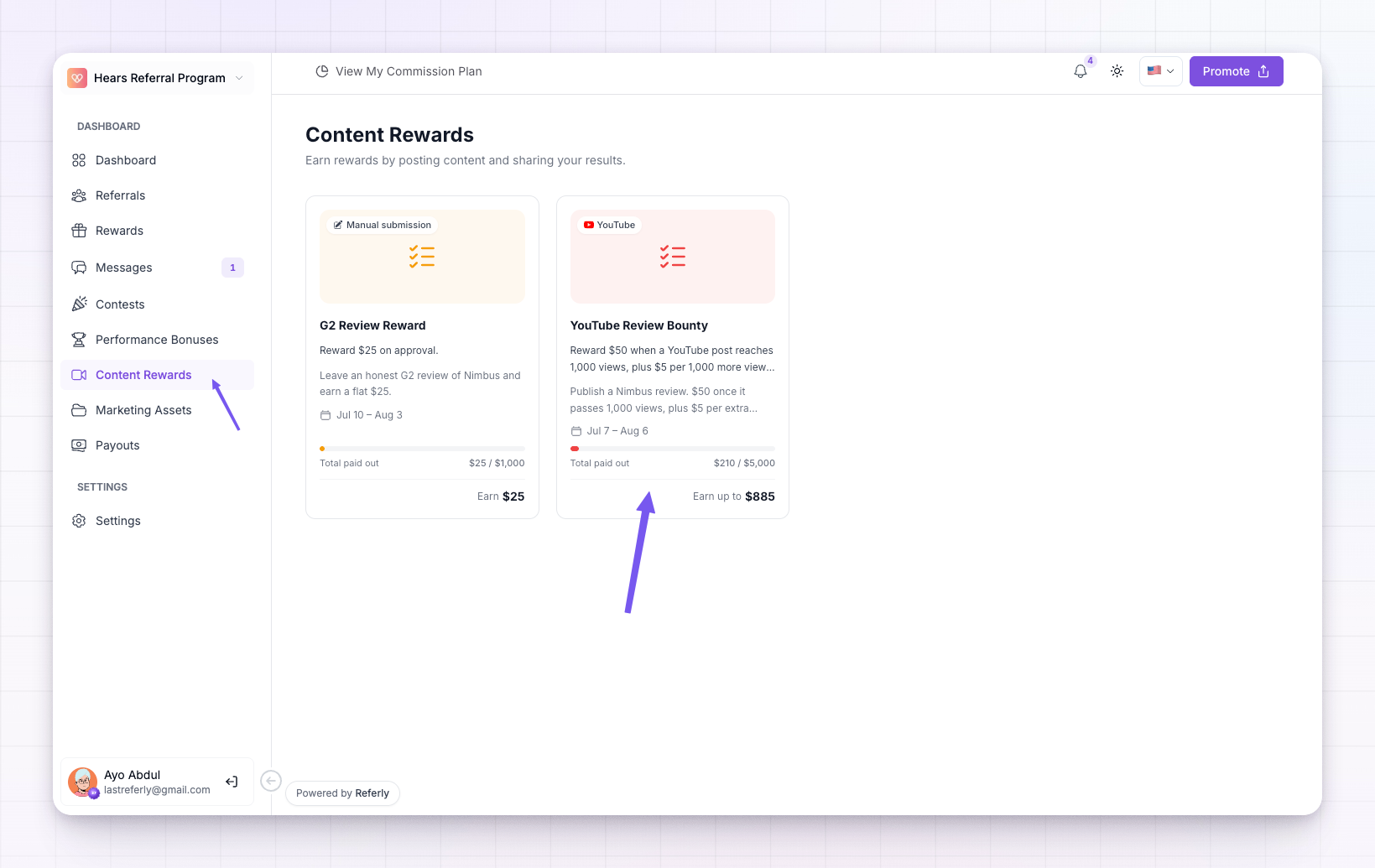
Where rewards end up
An approved content reward becomes an entry in your Rewards list labelled Content rewards, and is paid out the same way as commissions and bonuses. If you ever need to undo one, see Revert a paid reward.Related
Create a campaign
Set up a content reward offer for your affiliates.
Social metrics or manual review
Choose how a submission qualifies and how the reward is priced.
Review submissions
Approve or reject the content affiliates submit.
Revert a paid reward
Undo a reward after a submission was approved.