

When the prompt appears
As you Publish a new bonus (or Save Changes to one you’re editing), Referly looks at everyone in the bonus’s audience and finds any who already meet the goal but haven’t been paid it yet. If it finds some, an Award bonuses now? window opens before the bonus saves. This comes up most often when:- You choose the Lifetime scope, which counts everything an affiliate has done since they joined — so long-standing affiliates may already be over the target.
- You edit an existing bonus and lower the target or widen the audience, bringing already-qualified affiliates into range.
Awarding the bonus
The window shows exactly who’s about to be paid and how far past the goal they are — for example, 12 / 10 referrals — so there are no surprises. It lists the first several affiliates and tells you how many more there are.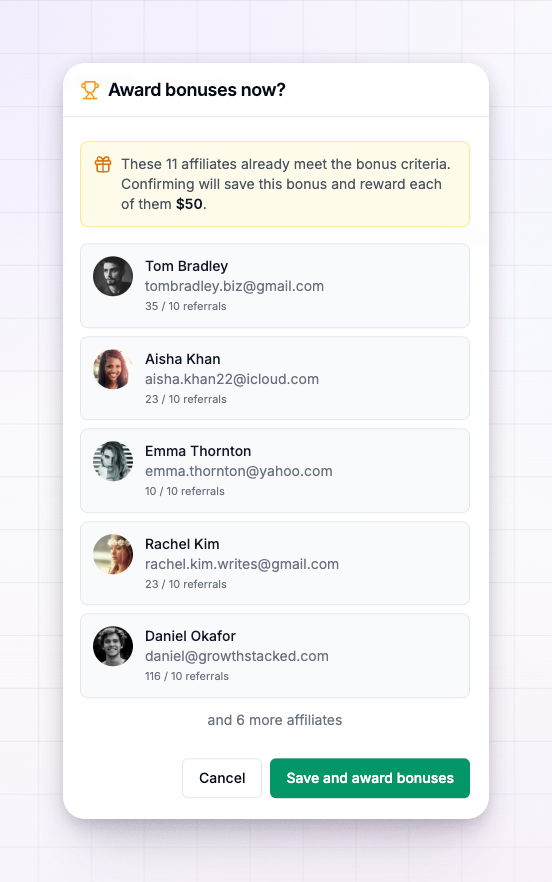 You have two choices:
- Save and award — saves the bonus and pays every listed affiliate their reward right away. Each earned bonus lands in that affiliate’s rewards and triggers their Performance Bonus Earned notification, exactly as if they’d just hit the goal.
- Cancel — closes the window without saving. Nothing is awarded, and you can adjust the bonus first.
Each affiliate can only earn a given bonus once. Affiliates who were already paid this bonus won’t appear in the prompt or be paid again.
After you award
Once awarded, these bonuses behave like any other earned reward — they carry an accepted status and are collected into payouts along with the affiliate’s commissions. From then on, the bonus keeps running: any affiliate who reaches the goal later is paid automatically, no prompt needed.Related
Create a performance bonus
Set the goal, the reward, and the audience.
Performance bonuses overview
How performance bonuses work end to end.
Managing bonuses
Find awarded bonuses in your rewards.
Managing payouts
How earned bonuses get paid out.