Before you start
A milestone always upgrades affiliates onto a commission plan, so the plan you want to reward them with needs to exist first. If you haven’t built it yet, set it up under commissions — or create one on the spot while adding the milestone, using the + Create new plan link in the dialog.Add a milestone
1
Open Affiliate Milestones
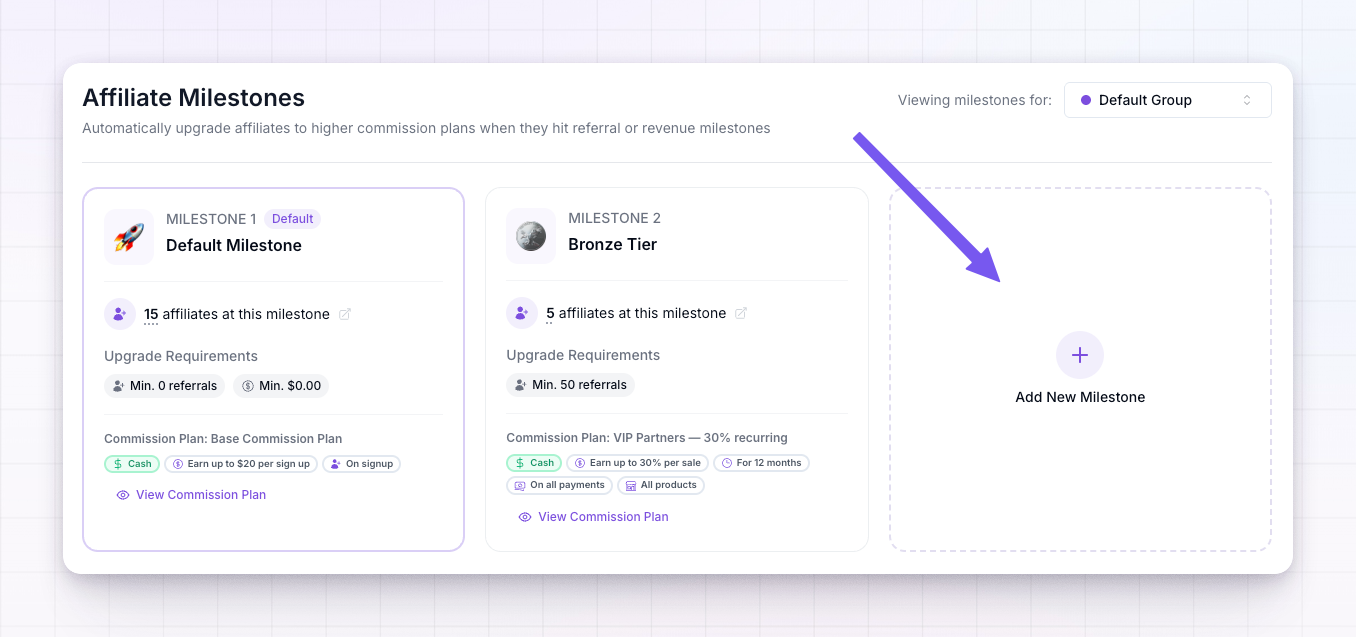
Select Affiliate Milestones in the left sidebar. You’ll see your existing milestones as cards, starting with Milestone 1 (your default).
2
Pick a group (optional)
If you want this milestone to apply only to a specific affiliate group rather than your whole program, choose it from the group selector at the top right. Otherwise leave it on Default Group.
3
Choose Add New Milestone
Select the Add New Milestone tile at the end of the grid.
4
Give it an emoji and a name
Click the circle at the top to pick an emoji, then type a Milestone Name — something your affiliates will recognise, like Bronze, Silver, or Gold. Both are required.
5
Choose the commission plan
Under Commission Plan, search for and select the plan affiliates should be upgraded to when they reach this milestone. This is the reward — it can pay a higher rate, run longer, or be a non-cash plan like a coupon or credits.
6
Set the upgrade conditions
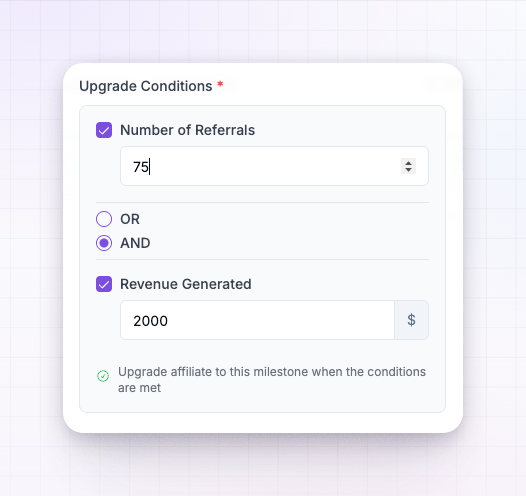
Under Upgrade Conditions, tick Number of Referrals, Revenue Generated, or both, and enter the target for each. See below for how the two combine.
7
Create the milestone
Select Create Milestone. It’s added to the ladder right away.
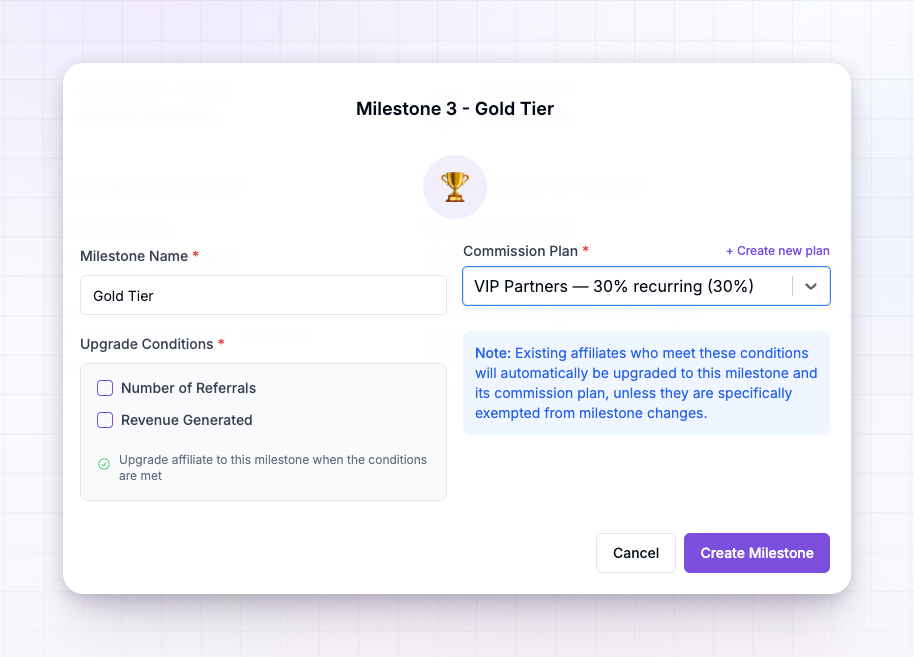
As soon as you save, any existing affiliate who already meets the conditions is upgraded to this milestone and its commission plan automatically — unless they’re exempt from milestone changes.
Setting the upgrade conditions
You can require a number of referrals, an amount of revenue, or both:- Number of Referrals — the minimum number of referred customers the affiliate needs.
- Revenue Generated — the minimum revenue the affiliate needs to have driven, in your program’s currency.
- Any — the affiliate reaches the milestone as soon as they meet either target.
- All — the affiliate must meet both targets to reach the milestone.
 Set your milestones so each one is harder to reach than the last. Referly always places an affiliate on the highest milestone they qualify for, so the ladder should climb from your standard terms up to your most generous.
The default milestone is different
Milestone 1 is your default — the starting point for every affiliate. You can rename it and change its emoji, but its conditions (zero referrals and zero revenue) and its commission plan are fixed, because it’s the baseline everyone begins from. Every milestone you add sits above it.Edit or remove a milestone
Hover over any milestone card to reveal its edit (pencil) and delete (trash) icons. Editing opens the same dialog so you can adjust the name, plan, or conditions. Deleting a milestone renumbers the ones above it and re-checks where each affiliate belongs. The default milestone can be renamed but not deleted.Related
Milestones overview
How milestones work and what affiliates see as they climb.
Setting up commissions
Build the commission plans a milestone upgrades affiliates onto.
Non-cash rewards
Reward a milestone with a coupon or account credits instead of cash.
Affiliate groups
Give a specific group its own set of milestones.