

Send a test event
Open your campaign, go to Settings, then Advanced, then Webhooks. Open the endpoint from its … menu with View Details, and select the Testing tab.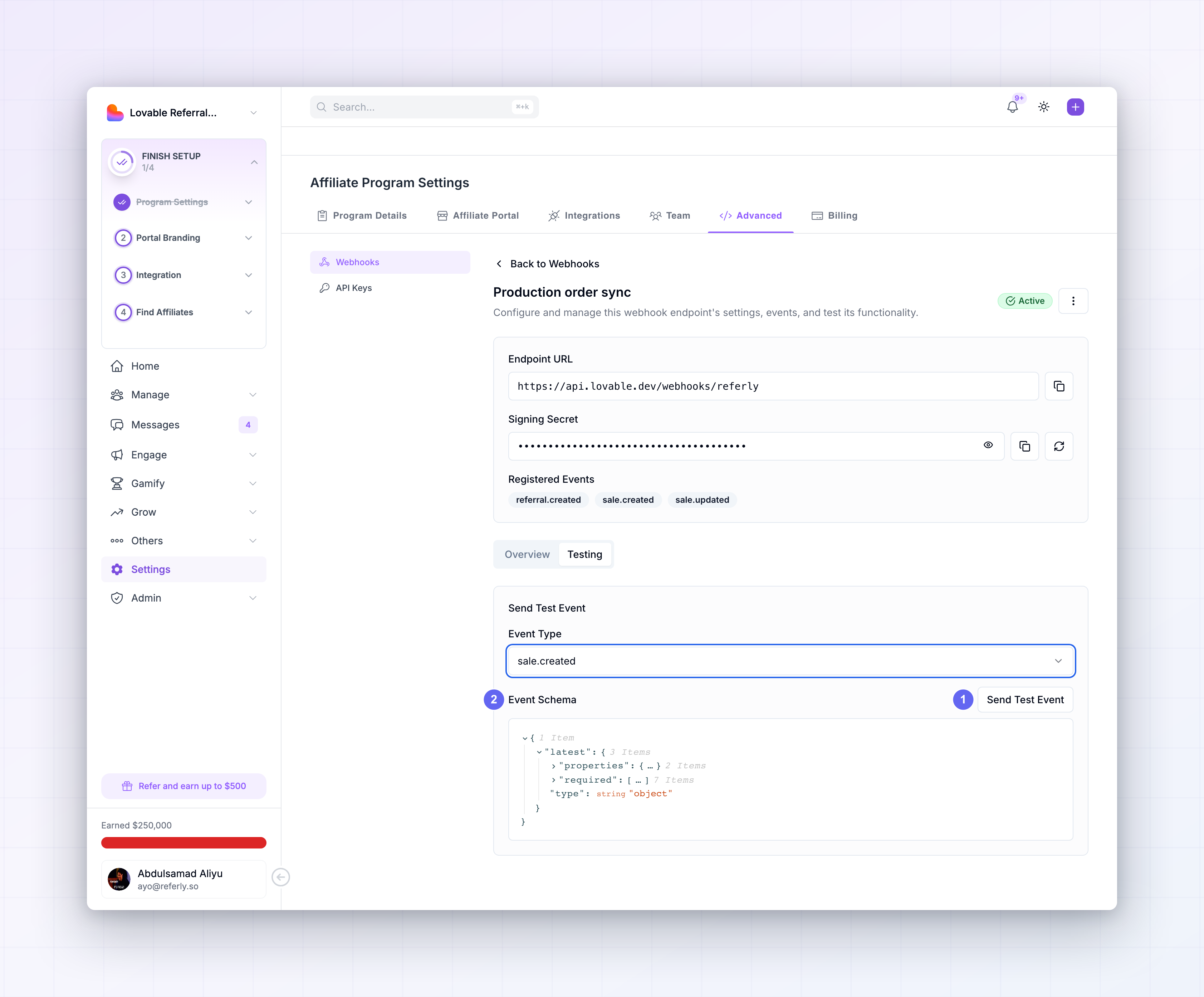
1
Pick an event
Choose from the Event Type dropdown. It lists all fifteen event types.
2
Send it
Select Send Test Event. A “Test webhook sent successfully” toast confirms the message left
Referly.
3
Check it landed
The toast only means Referly sent it. Whether your server accepted it is on the Logs tab, or
in Recent Activity on this endpoint’s Overview tab.
svix-id, svix-timestamp, and
svix-signature headers as production traffic, it is retried on failure, and it appears in the log
alongside everything else. If your signature verification passes on a test event, it will pass on a
real one.
Test events go only to the endpoint you sent them from. Your other endpoints on the same program
receive nothing, so you can test a new endpoint without waking up your production consumer.
What the test actually sends
Two things are worth knowing before you rely on a test payload.The panel on screen is the schema, not the payload
The JSON shown under Event Schema after you pick an event type is the registered schema for that event — the shape and types of its fields. It is not the body that gets delivered. To see the payload your server actually received, open the Logs tab, select the message, and read Message Content on the Message tab. That is the byte-for-byte record of what was sent. See Retries and logs.Coupon and promo code tests send an empty body
Referly has predefined sample payloads for thereferral.*, affiliate.*, and sale.* event types.
Those tests deliver a realistic, fully populated object.
To exercise a coupon or promo code handler, trigger the event for real: create or edit a coupon in
the dashboard with a scratch endpoint subscribed. That also gives you a genuine payload in the log to
resend later.
Even for the families that do have samples, the sample is illustrative. Enum values in samples appear
lowercase where live payloads send uppercase — see
Payload structure. Validate against a real
event before you go live.
Develop against a tunnel
Endpoints must be reachable from the public internet, sohttp://localhost:3000/webhooks receives
nothing. Put a tunnel in front of your local server and register the tunnel’s hostname.
https://a1b2-203-0-113-42.ngrok-free.app/webhooks/referly — and copy that endpoint’s own signing
secret into your local environment. It is a different secret from production.
Free tunnel hostnames change every time you restart. When yours changes, Edit the endpoint and
update the URL rather than creating another one, so your local secret stays valid and your delivery
history stays in one place.
Use a separate program for testing
Referly has one live environment — there is no sandbox, and API keys are not split into test and live modes. Endpoints are scoped to a program, so the clean separation is a second program. Create a test campaign, point your staging site at its program ID, and register your tunnel endpoint there. Test affiliates, referrals, and sales then live entirely in that program, and cannot reach your production endpoints or distort your real reporting. Sales you create while testing can be deleted afterwards. While you are building, subscribe your scratch endpoint to all fifteen event types. Seeing everything is what teaches you which events your integration actually needs, and it costs nothing on a program with no real traffic. Narrow the subscription before go-live — see Event types.Replay real events
A synthetic sample is never quite the real thing. Once a genuine event exists in your log, that is the best test fixture you have. Resend appears on a row in the Logs list and on each individual attempt in the Attempts tab. Both redeliver the same message, with the samesvix-id and the same stored payload.
This is the tightest loop for fixing a broken handler:
1
Find the failed delivery
Filter the Logs tab to Failed and open the message.
2
Read the response
Expand the attempt to see the response body your server returned — usually the error itself.
3
Fix and deploy
Patch the handler and ship it.
4
Resend
Select Resend. The original payload is delivered again, against your fixed code.
svix-id, it also doubles as an idempotency test. If your
handler is correct, the second delivery of an already-processed message is a no-op that returns
200.
Verify your handler end to end
Before you call an integration finished, confirm all six behaviours. Each maps to a real failure mode.
That fifth row matters more than it looks. A handler with a
switch and no default throws on the
first event type you did not anticipate — including a new one Referly adds later. Ignore what you do
not recognise and return 200.
The sixth is its mirror image: swallowing errors and returning 200 anyway means a failed delivery
is never retried and the event is lost silently. Let genuine failures fail.
Test without the dashboard
Your test suite should not depend on someone selecting Send Test Event. Thesvix library can
sign a request locally, so you can build a valid delivery in a unit test.
TEST_SECRET in the test environment and you can cover the whole matrix
offline — valid signature, tampered body, wrong secret, stale timestamp, duplicate svix-id, unknown
event type — without a network call.
Go live
When you move from the scratch endpoint to the real one:- Create the production endpoint against your production URL, on your production program. Do not repoint the test endpoint — keep the two separate so you can keep testing.
- Narrow the subscription to the events you actually handle, instead of the everything list you used while developing.
- Store the production signing secret in your production secret manager. It is different from the test endpoint’s secret.
- Confirm a real event lands. Trigger a genuine action — create an affiliate, record a test sale — and check the log shows Succeeded.
- Delete or disable the tunnel endpoint so it stops failing.
- Set up monitoring on your side. Nothing alerts you when deliveries start failing; see Retries and logs.
Related
Manage endpoints
Create the scratch and production endpoints.
Verify signatures
What a test event proves when it passes.
Retries and logs
Find a failed delivery and resend it.
Event types
Narrow your subscription before go-live.
Payload structure
What a real payload contains, versus a sample.
Webhooks introduction
How deliveries work end to end.