

Naming convention
Every event type isfamily.action, lowercase, with exactly one dot:
- Families:
affiliate,referral,sale,coupon,promocode - Actions:
created,updated,deleted
event key, so a switch on that string is usually all the
routing your handler needs.
Quick reference
Affiliate events
An affiliate is a person promoting your program. See the data model for how affiliates relate to links, referrals, and commissions.affiliate.created
Fires the moment an affiliate record exists, whatever created it:- A signup through your program’s affiliate signup widget or hosted page
- Someone redeeming an invite code
POST /api/v1/affiliates- A Zapier or Make action
- An affiliate added manually in the dashboard
This fires on creation, not approval. If your program reviews applications, a newly created
affiliate may be pending. Check
status on the payload, and watch affiliate.updated for the
transition. See statuses and enums.affiliate.updated
The busiest event in the system. It fires on profile edits, status changes such as approval or rejection, payout detail changes, commission plan or commission tier reassignment, and bulk actions applied across many affiliates at once. It also fires when an affiliate’s referral links are created, edited, or deleted — including throughPOST, PUT, and DELETE on /api/v1/links. There is no separate link event family;
link changes surface here, with the current links on the affiliate object.
If you only care about a subset — approvals, say — subscribe and filter in your handler on the
fields you track. Which leads to the next point.
affiliate.deleted
Fires when an affiliate is removed, from the dashboard,DELETE /api/v1/affiliates, Zapier, or Make.
The payload carries only the id.
Referral events
A referral is a customer who arrived through an affiliate and has been identified — the bridge between an anonymous click and the sales that follow.referral.created
Fires when attribution resolves a click into a tracked customer: your site reports a signup or the first payment, and Referly creates the referral against the affiliate who earned it. This happens through the tracking script, the server-side capture endpoints, an integration such as Stripe or Shopify, the API, or manual creation in the dashboard.Referrals created by a resync — when Referly backfills historical data from a payment provider
after you connect it — do not emit this event. That keeps a one-off import of thousands of past
customers from flooding your endpoint.
referral.updated
Fires on edits to the referral itself, and on subscription status changes pushed by your payment provider. A Stripe or Paddle subscription going active, past due, or cancelled reaches you here, with the current state in the payload’sstatus.
This is the event to watch if you mirror customer lifecycle state, and the one most likely to arrive
without you doing anything.
referral.deleted
Fires when a referral is removed from the dashboard, the API, Zapier, or Make. The payload carries only theid. Deleting a referral is how you undo bad attribution, so treat it as a signal to
reverse whatever you did on referral.created.
Sale events
A sale is one attributed payment, with the commission it generated.sale.created
Fires once for every payment attributed to an affiliate, and it fires from a single place in Referly no matter how the sale arrived:- Payment integrations — Stripe, Shopify, WooCommerce, Paddle, Chargebee, Polar, and the rest
- Server-side reporting from your backend
POST /api/v1/sales- Zapier and Make
- A sale entered manually in the dashboard
commissionEarned already expanded, and
paymentTrigger tells you which kind of payment produced it if you do want to branch.
For most integrations, this is the one event that matters.
sale.updated
Fires when a sale changes after the fact: the amount or commission is recalculated, the commission plan behind it changes, or the sale is rolled into a payout. That last case is how payout progress reaches you — checkpayoutCreated and payoutId on the entries in the sale’s commissions array.
sale.deleted
Fires when a sale is reversed or removed — a Stripe refund or dispute, a deletion from the dashboard,DELETE /api/v1/sales, the WooCommerce plugin cancelling an order, Zapier, or Make.
Coupon events
A coupon is the discount itself — the amount off, the currency, the duration. Customers never type a coupon; they type a promotional code attached to it. See coupons and promotional codes.coupon.created, coupon.updated, and coupon.deleted fire from the dashboard and from
/api/v1/coupons. The payload includes the coupon’s promotional codes.
Promo code events
A promotional code is the customer-facing string tied to a coupon, usually issued to a specific affiliate so their audience gets a discount and they get attribution without a link.promocode.created, promocode.updated, and promocode.deleted fire when codes are issued, edited,
or removed in the dashboard, including when codes are generated in bulk for a group of affiliates.
The payload includes the parent coupon.
What to actually subscribe to
Subscribing to everything is the most common mistake. Filtering happens at the endpoint, before delivery, so a narrow subscription means a quieter log and a cheaper handler.Most integrations
sale.created and affiliate.created. Revenue in, partners in — enough to drive fulfilment and
CRM sync.If you act on money
Add
sale.deleted and sale.updated, so refunds and payout state do not leave you out of sync.If you mirror the program
Add the
referral.* family and affiliate.updated to keep a full local copy.Rarely needed
The
coupon.* and promocode.* families, unless you manage discounts in another system.Update events carry no diff
Anupdated event gives you the object’s current state, not a list of what changed. There is no
previous_attributes and no changed-fields array.
If you need to know what changed — did the status flip to approved, did the commission rate move —
compare the payload against your own stored copy of the object. This is another reason to persist
what you receive rather than treating events as fire-and-forget.
Delete events are the mirror image: their body contains only the id, because the object is gone
and there is nothing left to expand.
Browse the Event Catalog
The dashboard has a live copy of this reference. Open Settings, then Advanced, then Webhooks, and select the Event Catalog tab. Each event type is listed with its description and an example payload matching the schema Referly registers for it.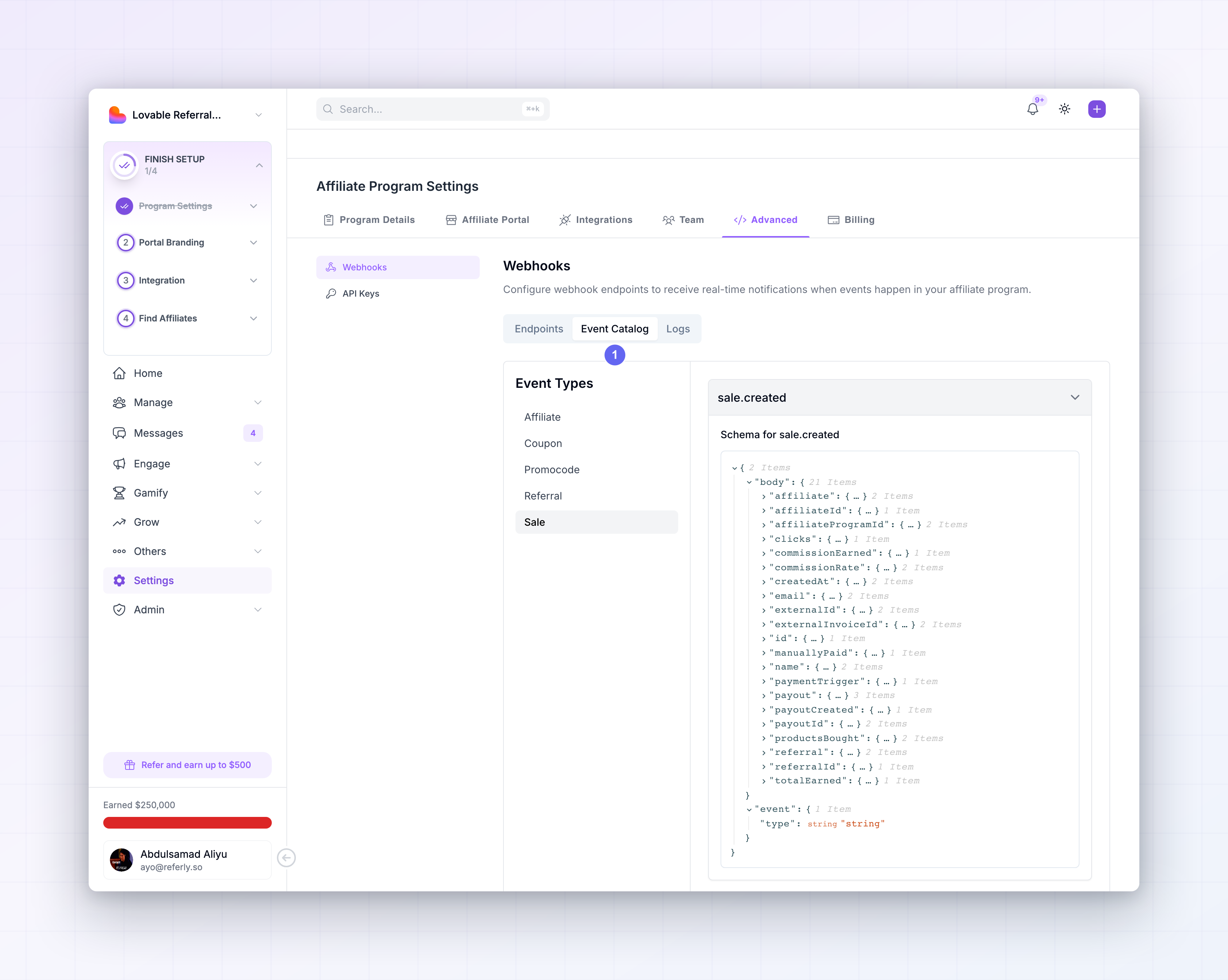 Use it to check a field name without leaving the dashboard, and the Testing tab on an endpoint to
send yourself a real example — see Test and replay.
Use it to check a field name without leaving the dashboard, and the Testing tab on an endpoint to
send yourself a real example — see Test and replay.
Events that do not exist
Worth stating plainly, so you do not build around something that will never arrive:- No payout events. Payout state reaches you on
sale.updated, throughpayoutCreatedandpayoutIdon the sale’scommissionsentries. Thepayout_batch.createdpayload you may see in the non-cash payouts setup wizard belongs to the Referly Payouts integration, a separate flow, and is not subscribable here. - No click events. Clicks are high volume and are not emitted as webhooks. Read them through the API instead — see click data.
- No link events. Referral link changes arrive as
affiliate.updated. - No commission or commission plan events. Commission values ride along on the sale.
Related
Payload structure
Every field inside each event, family by family.
Manage endpoints
Subscribe an endpoint to the events you picked here.
Verify signatures
Prove a request came from Referly before you trust it.
Retries and logs
What happens when your endpoint rejects an event.
Test and replay
Send a sample of any event type to your endpoint.
Data model
How affiliates, referrals, sales, coupons, and codes relate.