

Get your snippet
The snippet is generated for you with your program ID already filled in. In your Referly dashboard, open your program, go to the campaign settings, and copy the block under Insert this line of code in your website’s head tag.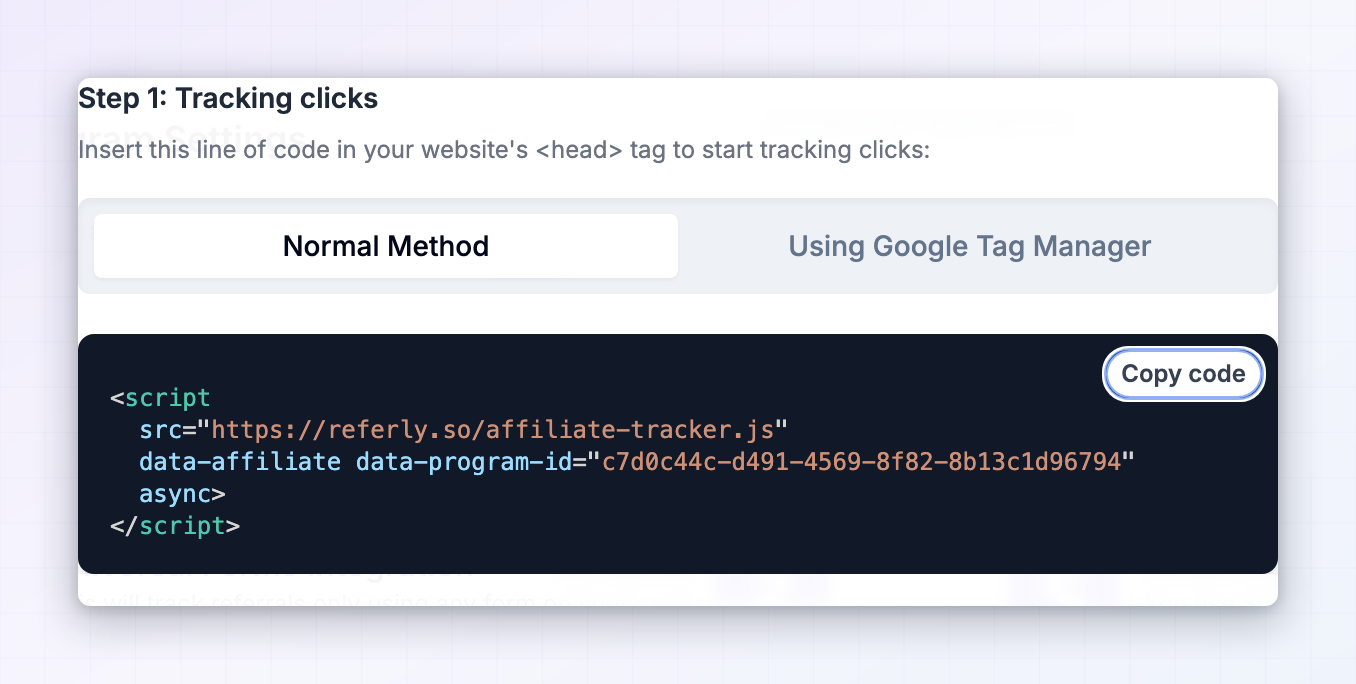 It looks like this:
Standard install
string
required
https://referly.so/affiliate-tracker.js. If your program is run through an agency white-label account, the dashboard gives you https://cdn.jsdelivr.net/npm/affiliate-tracker/dist/affiliate-tracker.js instead. Use whichever URL your dashboard shows — the script only recognises itself when loaded from a known origin.attribute
required
A valueless marker attribute. The tracker finds its own tag with
script[data-affiliate], so if you drop this attribute the script loads and then does nothing at all. This is the single most common installation mistake.string
required
Your program’s ID. Without it the tracker exits immediately.
Passing the program ID in the URL instead
If your host strips unknowndata- attributes from script tags, you can pass the program ID as a query parameter on the script URL:
data- attributes when you have the choice.
Where to put it
Put the snippet in thehead of every page on your site, not just your checkout or your homepage.
Affiliates link to whatever page they want — a blog post, a pricing page, a landing page, a comparison article. If the tracker isn’t on the page the visitor lands on, no click is recorded and there is nothing to attribute the eventual sale to. Site-wide installation is the only configuration that reliably works.
Install by stack
functions.php. See the WordPress guide for the options.
What happens when the script loads
Understanding the sequence makes debugging much faster. On page load the tracker:- Loads the public-suffix helper it uses to work out your registrable domain, so cookies can be set on
.your-domain.comand shared across subdomains. - Tests whether cookies are writable. If they aren’t, it falls back to
localStoragefor the whole session. See cookies and storage. - Checks for a cross-domain handoff on the incoming URL and restores attribution from it if present.
- Reads your program ID off the script tag. No ID, no tracking.
- Checks whether the URL carries any recognised referral parameter, and whether attribution already exists in storage. If neither is true it stops here — no network requests are made for ordinary visitors.
- Fetches your program’s configuration to learn your URL parameter, your cookie duration, your approved cross-domain list, and whether debug mode is on.
- Records the click against the affiliate and stores the result.
- Sets
window.affiliateRefandwindow.affiliateId, then fires the readiness events.
Globals and events it exposes
Once the tracker has resolved, these are available onwindow:
And two events fire on
window:
Always wait for one of these before reading the globals or calling the functions — the tracker resolves asynchronously, so code that runs on
DOMContentLoaded will usually run too early:
Verify the installation
1
Visit your site with a referral parameter
Take a real affiliate link from your dashboard, or append your program’s parameter yourself, and open it in a fresh browser profile:
https://your-domain.com/?ref=TESTCODE.2
Check the globals
Open the browser console and run
window.affiliateRef and window.affiliateId. The first should return the referral code; the second a numeric click ID as a string. If affiliateId still equals the referral code, the click request has not completed or failed.3
Check storage
In Application → Cookies, look for two entries named after your program ID: one ending
_affiliate_ref holding the code, one ending _affiliate_referral holding the click ID. If cookies were unavailable these appear under Local Storage instead.4
Check the dashboard
Reload your program’s analytics. The click should appear against that affiliate within a few seconds.
5
Navigate away and back
Open your site again with no parameters.
window.affiliateRef should still return the code — that’s the cookie window doing its job. See attribution and the cookie window.Content Security Policy
If you run a CSP, the tracker needs three allowances. Note that the script is served from the apex domain while the API lives onwww:
cdn.jsdelivr.net is required for the domain-parsing helper the tracker loads at startup. Blocking it degrades cookie scoping on subdomains.
Common mistakes
The data-affiliate attribute was dropped
The data-affiliate attribute was dropped
Minifiers, tag managers, and some CMS “insert script” fields strip valueless attributes. The tracker locates itself with
script[data-affiliate], so without it nothing happens and there is no error. In frameworks that require a value, write data-affiliate="".Installed only on the checkout or thank-you page
Installed only on the checkout or thank-you page
Attribution is created on the landing page, not the converting page. If the snippet isn’t on the page the affiliate linked to, the visit is never attributed.
Serving the site over HTTP
Serving the site over HTTP
Referly’s cookies are
Secure. On HTTP they are silently discarded and attribution never survives a page navigation. This most often bites on local development against http://localhost.Reading window.affiliateRef too early
Reading window.affiliateRef too early
The tracker resolves after one or two network round trips. Code in an inline script, or on
DOMContentLoaded, runs first and sees null. Listen for affiliate_referral_ready instead.Two copies of the snippet on one page
Two copies of the snippet on one page
Installing through both your theme and a tag manager loads the tracker twice. Remove one; duplicate clicks are the usual symptom.
Using a parameter your program doesn't use
Using a parameter your program doesn't use
The tracker only honours the referral parameter configured for your program. Testing with
?ref= when your program is set to ?via= produces nothing. See URL parameters.Related
URL parameters
Which parameters the tracker recognises and how to change yours.
Cookies and storage
What gets written to the browser, and the localStorage fallback.
Attribution and the cookie window
How Referly decides which affiliate gets credit.
Debug mode
Turn on console logging to troubleshoot an install.
JavaScript API
Record sign-ups, sales, and cart events from the browser.
Server-side tracking
Report conversions from your backend instead.