

Your program’s referral parameter
Each program has exactly one referral parameter, and the default isref:
window.location.search only. A referral code hidden in the hash fragment (/#/?ref=jane) is invisible to it, which matters if you run a hash-router SPA.
Change your parameter
If?ref= clashes with something your app already uses, or you’re migrating from another platform and need to keep old links working, pick a different one. In your dashboard open the campaign settings and find Affiliate URL Tracking, then choose from the parameter list.
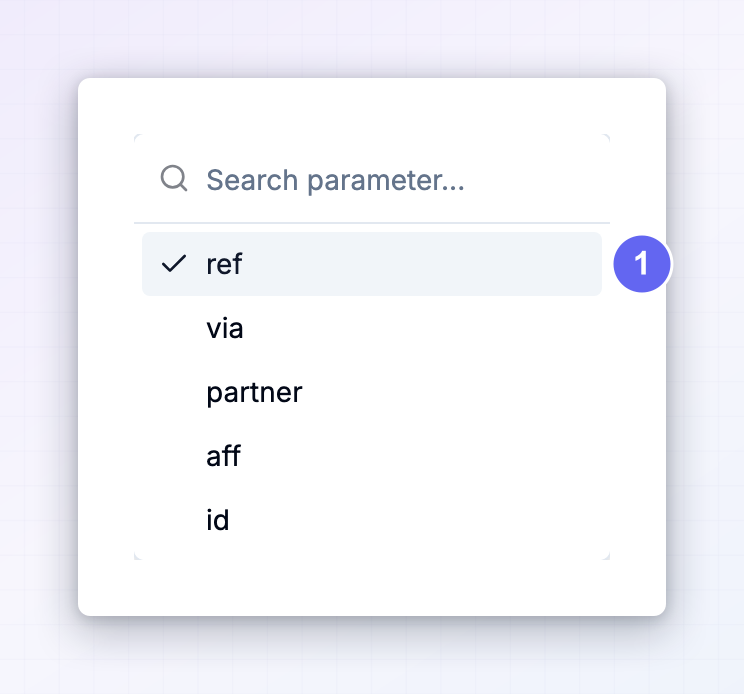
The full parameter list
You can’t invent your own parameter — you choose from this fixed list. Most exist so you can match the parameter another platform used before you migrated:partener is a deliberate misspelling kept for compatibility with a platform that shipped it that way. If you’re migrating, match whatever your old links actually used, typo and all.?REF=jane is not ?ref=jane.
How a parameter is matched
The tracker checks the URL in two stages, and the difference between them explains most “why isn’t this tracking?” questions.Stage one: is any referral parameter present?
Before making any network request, the tracker scans the URL for any name on the list above. If it finds none, and the browser has no stored attribution from an earlier visit, it stops right there — no requests, no cost, nothing recorded. This is why ordinary organic traffic is free of overhead.Stage two: does it match your program?
Only if stage one passes does the tracker fetch your program’s configuration and read the parameter you actually configured. A link built with?via=jane when your program is set to ref clears stage one but fails stage two: the visit is not attributed to anyone.
Getting this wrong is the usual cause of a link that “looks right” and records nothing. If clicks aren’t appearing, confirm the parameter in the link is character-for-character the one in your settings.
Precedence: what happens when a code is found
The tracker weighs the code in the URL against whatever is already stored in the browser. There are five outcomes.
That last row is the important one: the most recent affiliate link wins. If a visitor clicks Jane’s link on Monday and Sam’s on Wednesday, Sam owns the attribution from Wednesday onward. See attribution and the cookie window for how long each of these survives.
Other parameters Referly reads
rsubID — your own click identifier
AppendrsubID to an affiliate link to attach an identifier of your own to the click:
_plg_ref and _plg_cid — cross-domain handoff
These two are written by Referly, not by you. When a visitor with active attribution clicks a link to another domain on your approved cross-tracking list, the tracker appends the referral code as_plg_ref and the click ID as _plg_cid so the receiving domain can pick the attribution back up.
On the receiving side, the tracker reads them, restores the attribution into that domain’s own storage, and then removes both parameters from the address bar with history.replaceState — so visitors never see them and they don’t end up in shared links or your analytics.
Never add these by hand. See cross-domain tracking.
UTMs and ad click IDs
When a click is recorded, the tracker also captures whatever campaign parameters happen to be on the URL. These do not affect attribution — the referral code alone decides who gets credit — but they’re stored on the click so you can segment traffic later.
The presence of an ad click ID also classifies the visit as paid traffic. Without one, the visit is classified from the referring domain instead — search, social, email, direct, or unknown. See UTM and ad click IDs.
So an affiliate running paid ads to your site can send a link like this, and all three layers are recorded together:
Building links your affiliates can use
You don’t need affiliates to assemble URLs by hand. Configure your landing pages in the campaign settings and Referly generates the correct link for each affiliate, with your parameter and their code already in place. You can attach fixed extra query parameters to a landing page too, and they’ll be carried on every link built from it.Troubleshooting
The link has a code but nothing is recorded
The link has a code but nothing is recorded
The parameter name doesn’t match your program’s. Compare the link against Affiliate URL Tracking in your campaign settings —
?via= will not work on a program configured for ref.The code is in the hash, not the query string
The code is in the hash, not the query string
https://your-domain.com/#/pricing?ref=jane puts the parameter inside the fragment, which the tracker never reads. It has to be in the query string, before any #.Your framework strips unknown query parameters
Your framework strips unknown query parameters
Some routers and edge redirects rewrite URLs and drop parameters they don’t recognise. If a redirect fires before the tracker runs, the code is gone by the time it looks. Preserve the query string across any redirect on your landing pages.
A returning visitor is credited to the wrong affiliate
A returning visitor is credited to the wrong affiliate
Expected behaviour. The most recent affiliate link wins, and it overwrites what was stored.
You changed the parameter and clicks stopped
You changed the parameter and clicks stopped
Old links are dead. Regenerate them for your affiliates, or change the parameter back.
Related
Install the snippet
Get the tracker onto your site before testing any link.
Attribution and the cookie window
How long a referral survives and who wins a conflict.
Cookies and storage
Where the referral code is kept in the browser.
External click IDs
Using rsubID to reconcile clicks with your own systems.
UTM and ad click IDs
Everything captured alongside the referral.
Cross-domain tracking
How _plg_ref and _plg_cid carry attribution between domains.