

There’s no WordPress card in Settings, then Integrations in your Referly dashboard. That’s expected. WordPress is where your site lives, so you’ll be using the card that matches your checkout instead: one of the Stripe guides, or Woocommerce. This article tells you which.

What you can and can’t track
Before you start
You’ll need:- A live Referly program with at least one affiliate to test with. See setting up your program if you haven’t got that far.
- An administrator account on your WordPress site.
- To know how you take payment, because that decides the second half of the setup.
Get your tracking script
Your script is inside Referly with your program’s own identifier already filled in. Open Settings from the left sidebar, select Integrations, and open Instructions on whichever card matches your checkout. Every one of them shows the same tracking script under Step 1. It looks like this, with your own identifier in place ofYOUR_PROGRAM_ID:
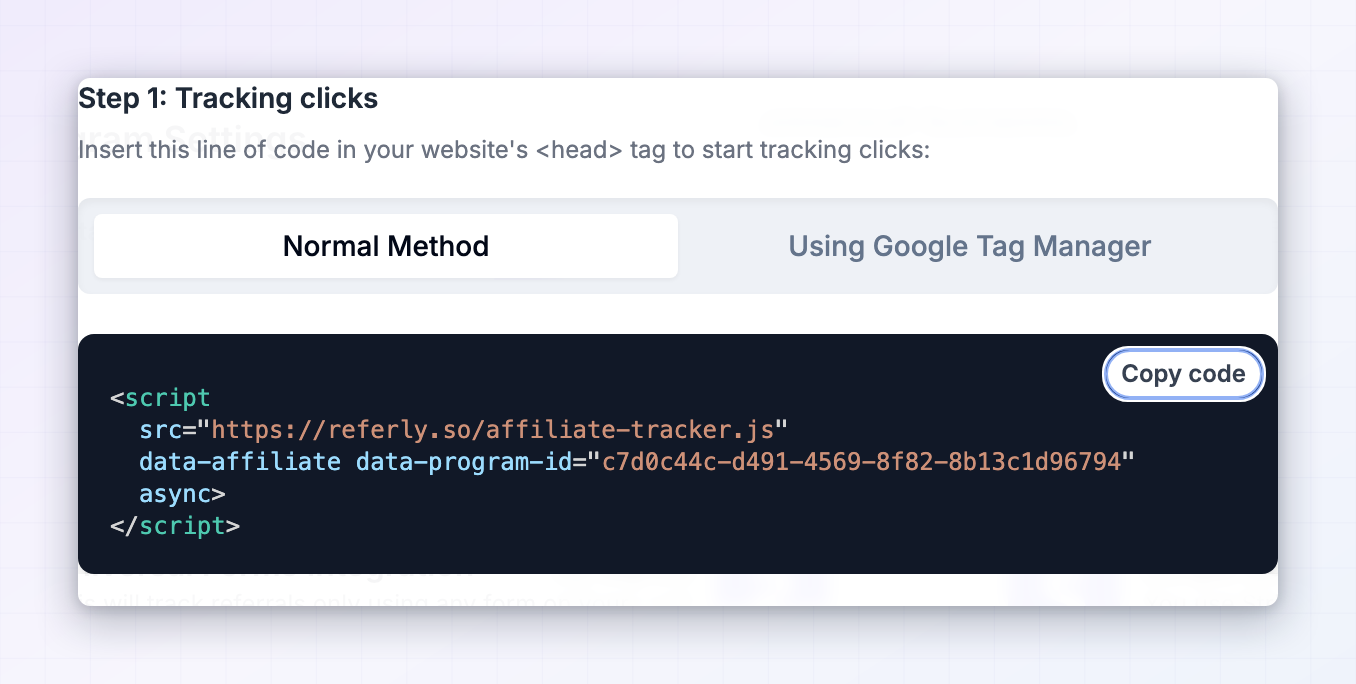 Copy it now. The next section covers where to put it.
Add the script to WordPress
The script belongs in thehead section of every page on your site. Pick one of the four methods below, whichever fits your setup. You only need one.
- Plugin (recommended)
- Your theme's own setting
- Child theme (advanced)
- Google Tag Manager
A header-and-footer plugin is the safest option for most people. It survives theme changes and theme updates, and it needs no code knowledge. Referly recommends WPCode, which used to be called Insert Headers and Footers, but any similar plugin works.
1
Install the plugin
In your WordPress admin, go to Plugins, then Add New Plugin. Search for WPCode, select Install Now on WPCode - Insert Headers and Footers + Custom Code Snippets, then select Activate.
2
Open the header and footer settings
A new Code Snippets item appears in your left admin menu. Go to Code Snippets, then Header & Footer.
3
Paste into the Header box
You’ll see three boxes: Header, Body, and Footer. Paste the tracking script into the Header box. It has to be the Header one, so tracking starts before the rest of the page loads.
4
Save
Select Save Changes. The script is now on every page of your site.
Check that caching and consent plugins aren’t blocking it
This is the part that catches WordPress users out, and it’s worth ten minutes before you go any further. Your script can be perfectly installed and still never run.Caching plugins
After adding the script, clear your cache. Every caching plugin serves visitors a saved copy of your pages, and until you clear it, they’ll keep getting the old version without your script. In WP Rocket, W3 Total Cache, LiteSpeed Cache, WP Super Cache, or whatever you use, find the option to clear or purge all caches and run it. Then check your plugin’s minification and JavaScript optimisation settings. Options named things like “Combine JavaScript”, “Defer JavaScript”, “Delay JavaScript execution”, or “Load JavaScript deferred” can stop the tracking script working properly, usually by making it run too late to catch the visit. If tracking doesn’t work after everything else checks out, add the Referly script to your plugin’s exclusion list, which most of them offer.Cookie and consent banners
If you use a consent plugin like Complianz, CookieYes, or Borlabs, check whether it’s set to block scripts until a visitor accepts. If it is, and your visitor declines or ignores the banner, no click is recorded and that affiliate loses the referral. This is a real trade-off rather than a bug, and where you land on it depends on your legal obligations and where your visitors are. Decide deliberately rather than discovering it later.Cloudflare Rocket Loader
If your site sits behind Cloudflare with Rocket Loader turned on, it changes how scripts load and can break tracking. The fix is to tell Rocket Loader to leave the script alone by adding one attribute, which must come beforesrc:
Security and firewall plugins
Some security plugins strip script tags from admin fields as a precaution. If you paste the script, save, and it’s gone when you come back, that’s what happened. Use the plugin method instead, since dedicated code plugins are designed to hold scripts safely.Choose how your sales get recorded
The tracking script recognises the visitor. Something else has to tell Referly a sale happened. Find your situation below.Running WooCommerce? Everything above about installing the script still applies, then follow the WooCommerce article for the order side. Don’t set up both WooCommerce and a Stripe payment link setup for the same products, or you’ll record each sale twice.
Track sign-ups and form submissions
If you want affiliates credited for leads and registrations rather than only sales, add this second script. It watches the forms on a page and records the email address when someone submits one. Add it to the page where people sign up or enter their email, near the bottom, before the closingbody tag. Using a header-and-footer plugin, that’s the Footer box under Code Snippets, then Header & Footer.
Test it end to end
1
Grab a real affiliate link
Open Affiliates in the left sidebar of Referly, pick an affiliate, and copy their referral link.
2
Clear your cache first
Purge your caching plugin, and Cloudflare’s cache too if you use it. Testing against a cached page is the most common way to waste an afternoon here.
3
Open the link in a private window
Use a private or incognito window. Visit the link and let the page finish loading. If a cookie banner appears, accept it, so you’re testing the path most visitors take.
4
Check the click was recorded
In Referly, look at your affiliate’s clicks. A new one should appear within a moment. If it doesn’t, the script isn’t running, so stop here and work through the troubleshooting below before going further.
5
Complete a sign-up or purchase
In the same window, sign up or buy something using details you haven’t used before.
6
Check Referly
Open Customers in the left sidebar. The referral should appear within a minute, credited to the affiliate whose link you used, with the amount if it was a purchase.
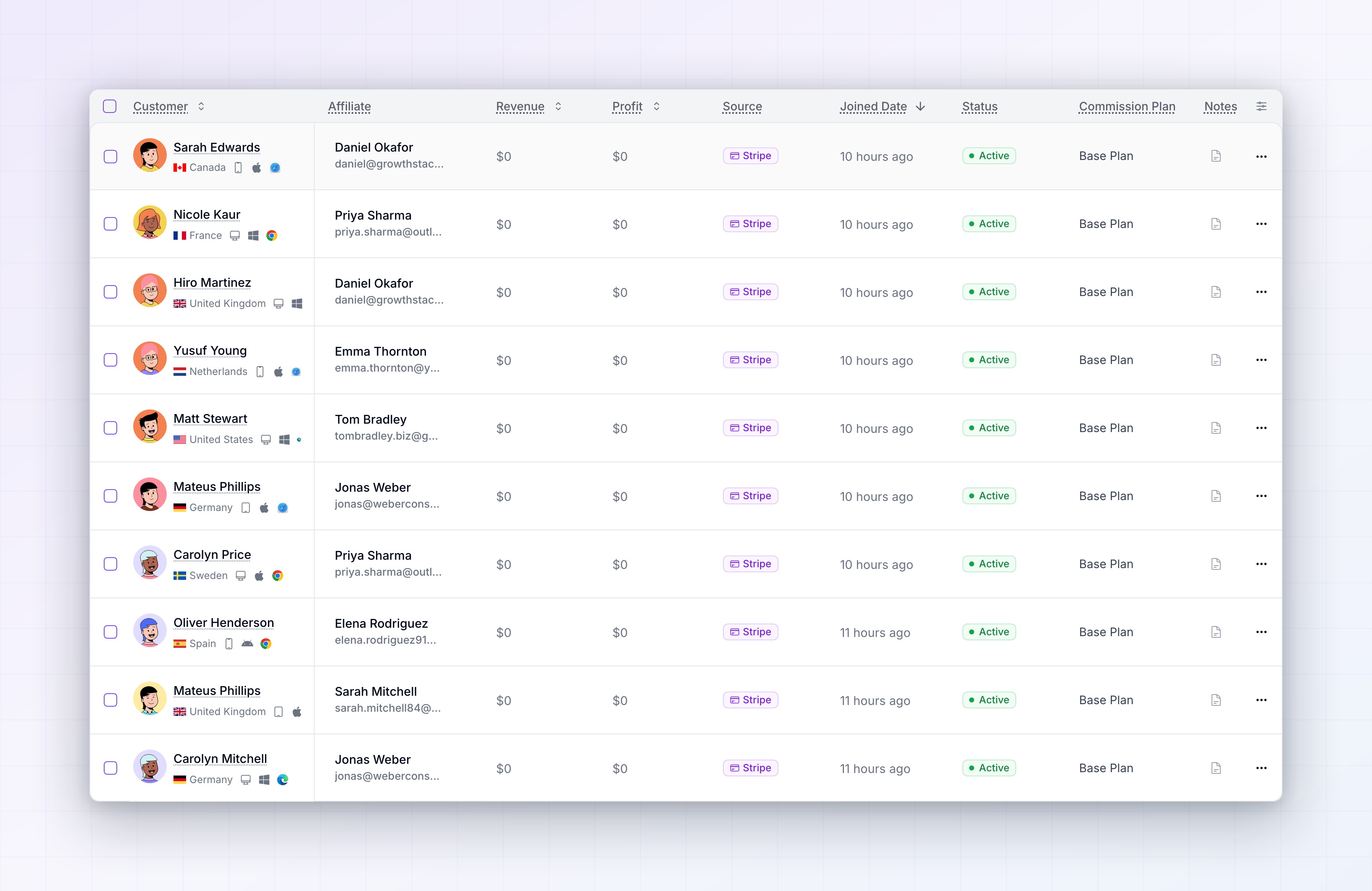
When the click appears and the sign-up or sale appears against the right affiliate, both halves are working.
Limitations to be aware of
- WordPress itself never records a sale. It’s the site, not the checkout. Something else always has to report the money.
- Caching can hide changes for hours. Always clear your cache after any change, and again before testing.
- Consent banners can cost you referrals. If scripts are blocked until a visitor accepts, declined banners mean uncounted clicks.
- Theme-based installation doesn’t survive a theme change. Use a plugin if you expect to redesign.
- Never edit parent theme files. Updates overwrite them and tracking disappears without warning.
- The form script captures leads, not revenue. Sign-ups arrive with no value attached.
- The visitor must convert in the browser they clicked in. Clicking on a phone and buying on a laptop won’t match.
- Ad blockers and strict privacy settings stop the tracking script for a small share of visitors, as with any affiliate tool.
Troubleshooting
No clicks are recorded at all
No clicks are recorded at all
Work through this in order. Clear every cache, including your caching plugin and Cloudflare. Confirm the script is still saved where you put it, since some security plugins strip script tags on save. Confirm it’s in the Header box rather than Body or Footer. Then load your site with an affiliate link on the end, in a private window, and check again.
The script disappears after I save it
The script disappears after I save it
A security or firewall plugin is stripping it. Use a dedicated header-and-footer plugin like WPCode, which is built to store scripts safely, rather than pasting into a general-purpose settings field.
It worked, then stopped after a site update
It worked, then stopped after a site update
If the script was in your theme’s files or settings, a theme update or theme change removed it. Move it into a header-and-footer plugin so it’s independent of your theme.
Tracking is unreliable, working sometimes but not always
Tracking is unreliable, working sometimes but not always
This pattern points at JavaScript optimisation. In your caching plugin, look for settings named “Combine JavaScript”, “Defer JavaScript”, “Delay JavaScript execution”, or similar, and add the Referly script to the exclusion list. If you use Cloudflare, check whether Rocket Loader is on and add the
data-cfasync="false" attribute shown above.Clicks are recorded but sales never are
Clicks are recorded but sales never are
The first half works and the second half isn’t set up. Find how you sell in the table above and follow the setup it points to. The tracking script on its own never records a sale.
Sign-ups aren't being captured
Sign-ups aren't being captured
Check that both scripts are on the sign-up page: the tracking script in the header, and the form script in the footer. If your form plugin submits without a normal form submission, this script won’t catch it, and the universal setup is the better route.
Every sale is recorded twice
Every sale is recorded twice
You have two setups running for the same products, most often WooCommerce alongside a Stripe payment link setup. Pick one and remove the other.
A referral wasn't credited even though the customer used an affiliate link
A referral wasn't credited even though the customer used an affiliate link
Check whether they clicked on one device and converted on another, whether the click was older than your cookie window, or whether a cookie banner blocked the script on their visit. You can attach the referral to the right affiliate by hand from the customer’s page, described in managing referred customers.
Related
WooCommerce
Record orders from a WooCommerce store.
Stripe payment links
The most common way to sell from a WordPress page.
Universal integration
Track a checkout that isn’t listed.
All integrations
See every platform Referly connects to.