


What this integration can and can’t track
A booking with no payment attached still counts. It arrives as a referred customer with no revenue, which is exactly what you want if you’re paying affiliates per qualified call rather than per sale. You can add the sale by hand later when the deal closes.
Before you start
You’ll need:- A live Referly program with at least one affiliate to test with. If you haven’t got that far, start with setting up your program.
- A paid Calendly plan. Redirecting invitees to your own page is a Standard, Teams, or Enterprise feature and isn’t available on Calendly’s free plan. Without it, none of this can work.
- Access to edit your website’s code, or someone who can paste two snippets for you.
- If you want revenue tracked: payment collection already set up on your Calendly event type, through Stripe or PayPal.
Make sure affiliates link to your site, not to Calendly
This is the step people get wrong, and it’s the one that quietly breaks everything else. Referly can only recognise a referred visitor on pages that carry the Referly tracking script. You control your own website, so you can put the script there. You don’t controlcalendly.com, so you can’t put it there. An affiliate link that points straight at your Calendly page is invisible to Referly, and no amount of setup elsewhere will fix it.
So the affiliate’s link must land on your website. From there, the visitor can reach Calendly however you like.
Calendly’s own embed options overview walks through adding the inline, popup widget, and popup text link versions to your site.
Add the Referly tracking script to your site
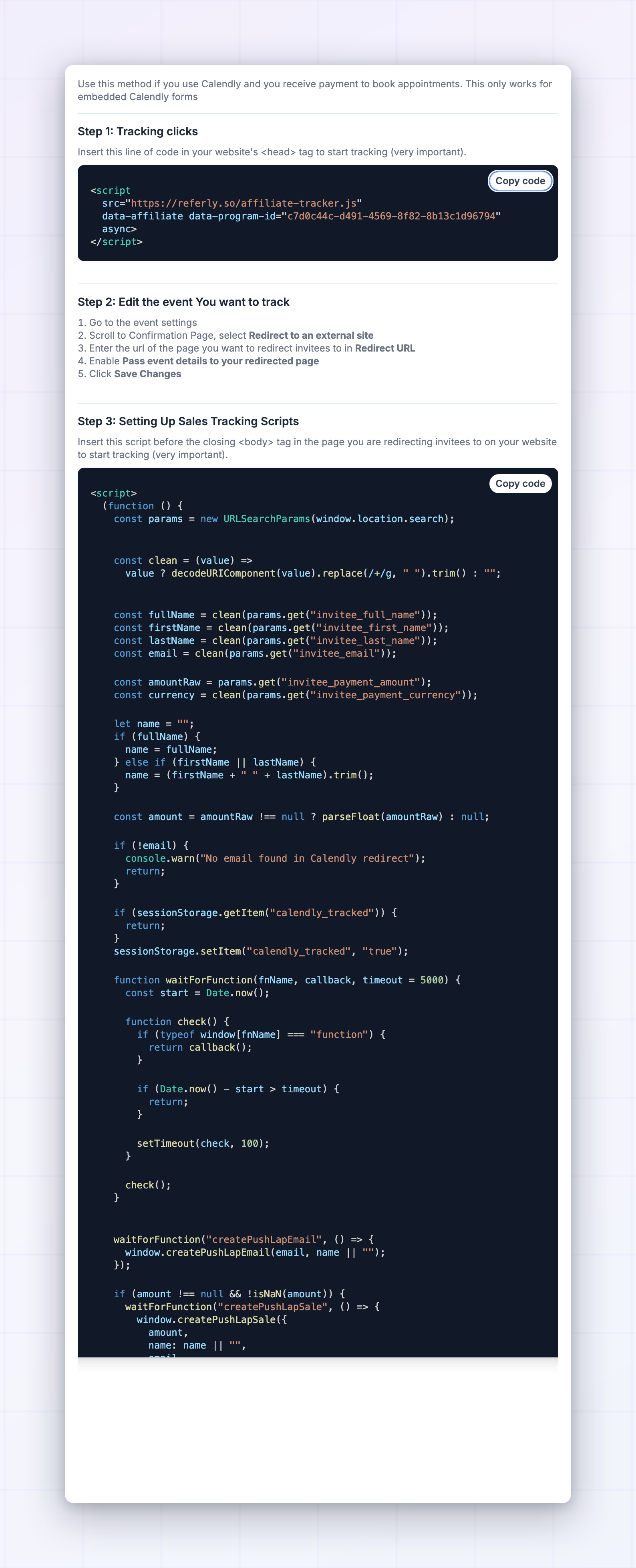
This is what notices a visitor arriving on an affiliate link and remembers it in their browser for the length of your cookie window. Copy the script from Step 1: Tracking clicks in the instructions window. It has your program’s own identifier already filled in whereYOUR_PROGRAM_ID appears below:
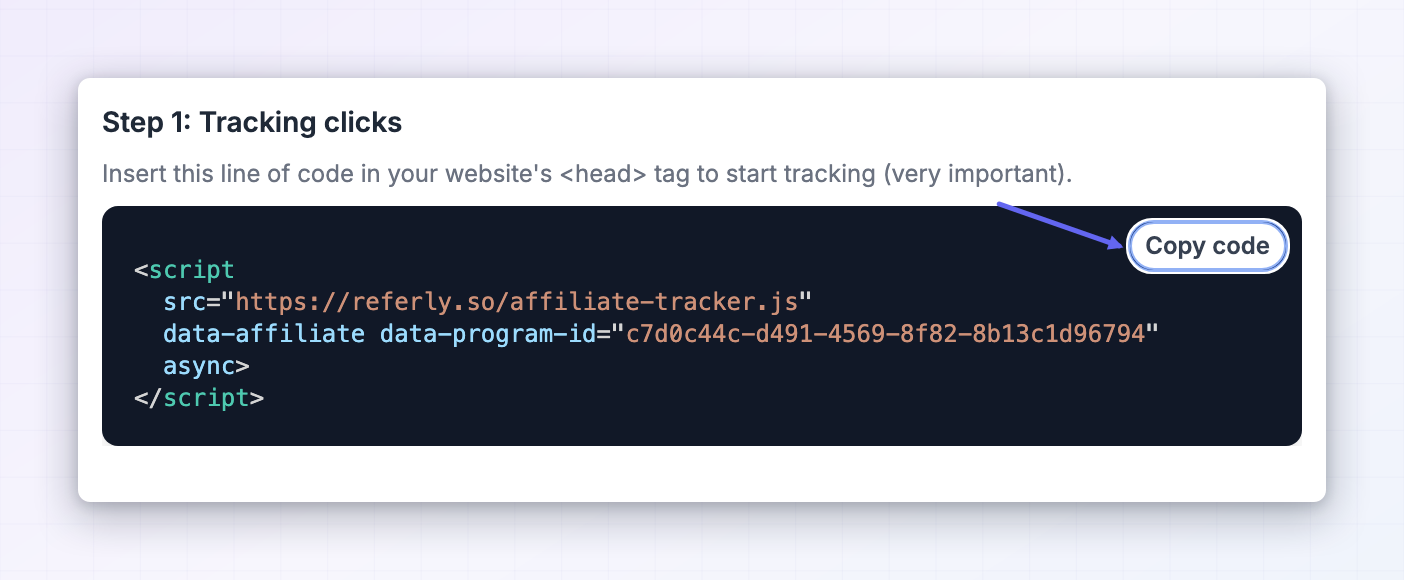 Paste it into the
 head section of your site, ideally through a site-wide setting so it lands on every page at once. On Webflow that’s Site settings, then the Custom code tab, then the Head code field, followed by publishing the site. On WordPress, most themes and plugins offer a “header scripts” box. If you use Google Tag Manager, create a Custom HTML tag set to fire on All Pages.
Create the page invitees land on after booking
Calendly needs somewhere on your site to send people once they’ve booked. If you don’t already have a thank-you page, make one now. Something likehttps://your-site.com/booking-confirmed is fine. Keep it simple: confirm the meeting is booked, say what happens next, and add anything useful like a calendar reminder or a short prep note. It’s a real page your customers will see, so it’s worth a minute of thought.
The important part is that it lives on your own domain and carries the tracking script from the previous step. That’s what allows Referly to connect the booking to the visit.
Turn on the redirect in Calendly
Now tell Calendly to send invitees to that page and to pass the booking details along with them.1
Open the event type
In Calendly, go to your Scheduling page (called Event Types in some accounts) and find the event type you want to track. Select the three-dots menu on it and choose Edit.
2
Open More options
Scroll to the bottom of the editor and select More options.
3
Expand the Confirmation page section
Find and expand Confirmation page.
4
Choose the redirect
Under After booking, select Redirect to an external site.
5
Enter your page address
In the Redirect URL field, enter the full address of the thank-you page you made, for example
https://your-site.com/booking-confirmed.6
Turn on passing event details
Turn on Pass event details to your redirected page. This is the step that actually carries the invitee’s name, email, and payment amount across to your page. Without it, Referly has nothing to record and the whole setup does nothing.
7
Save
Select Save to apply the change to that event type.
This is set per event type, not once for your whole account. If affiliates can send people to three different meeting types, repeat these steps for each one. They can all point at the same thank-you page.
Add the booking script to your thank-you page
The last piece. This code reads the booking details Calendly passed across and hands them to Referly. Copy it from Step 3: Setting Up Sales Tracking Scripts in the instructions window, and paste it into your thank-you page just before the closingbody tag. On Webflow that’s the Before </body> tag field in that page’s own settings. It goes on the thank-you page only, not site-wide.
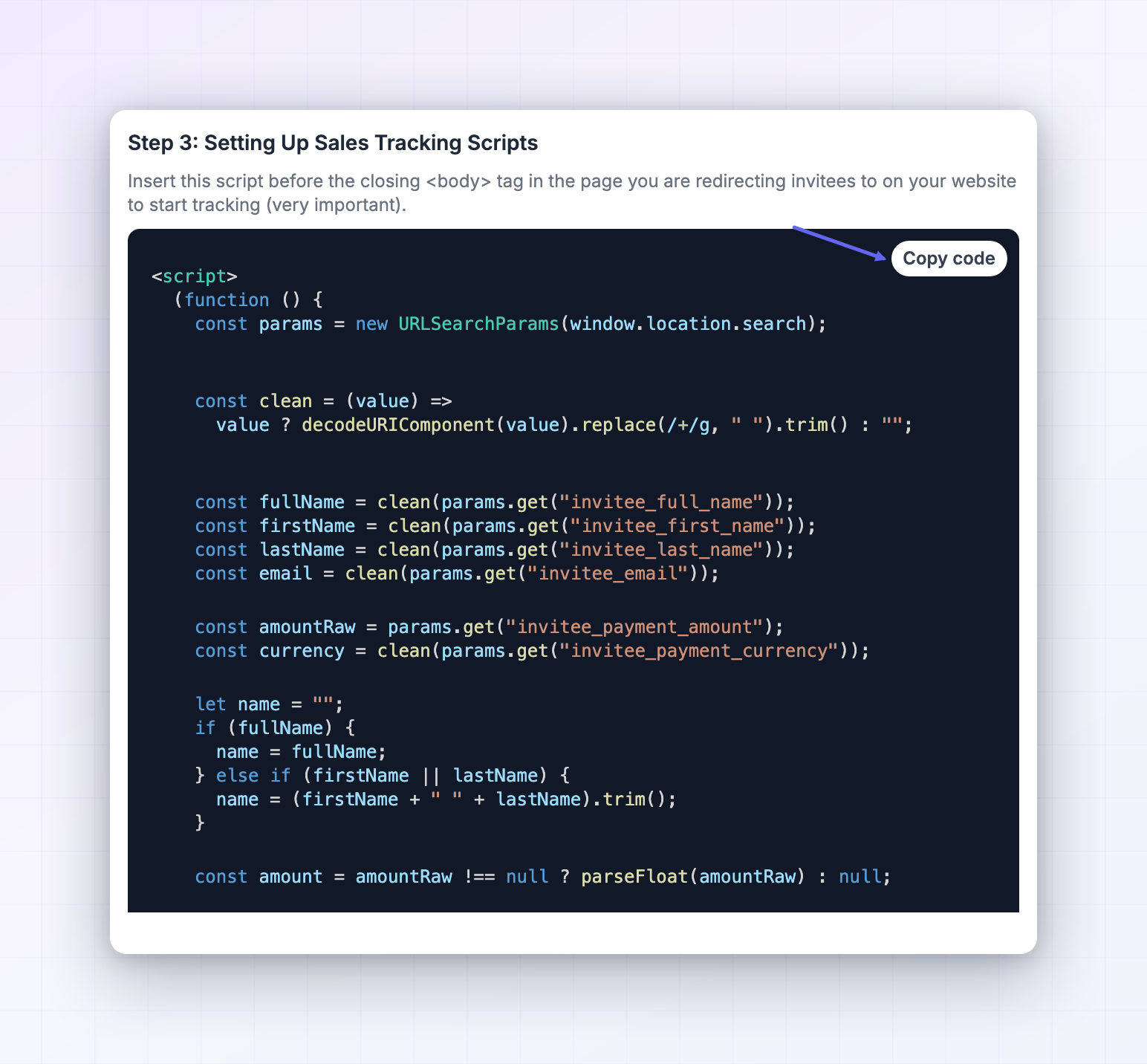 A few things this handles for you, so you don’t have to worry about them:
- Visitors who didn’t come from an affiliate are ignored. The script runs on every booking, but Referly records nothing when there’s no referral in the browser. Your organic bookings won’t be credited to anyone by mistake.
- Bookings with no payment are recorded as a referred customer with no revenue. Only bookings where Calendly collected money get a sale attached.
- The same booking won’t be counted twice if the visitor refreshes the thank-you page.
Test it end to end
Do this before you tell any affiliate the integration is live.1
Grab a real affiliate link
Open Affiliates in the left sidebar, pick any affiliate, and copy their referral link.
2
Open it in a private window
Use a private or incognito window so no old tracking gets in the way. Visit the link and let the page finish loading. This is the moment the referral is recorded.
3
Book a meeting the way a customer would
Go to your Calendly scheduler the same way a visitor would, whether that’s the embed on your page or a button that opens Calendly, and book a real slot with an email address you haven’t used before.
4
Watch where you land
After booking you should end up on your own thank-you page, and the address bar should be full of booking details after the page name. If you land on Calendly’s own confirmation screen instead, the redirect isn’t saved on that event type. If you land on your page but the address is clean with no details after it, Pass event details to your redirected page is off.
5
Check Referly
Open Customers in the left sidebar. Your test booking should show up within a minute, with the invitee’s name and email, credited to the affiliate whose link you used. If you charged for the meeting, the amount and its commission appear alongside it.

When the test booking appears under Customers against the right affiliate, the integration is working end to end.
How Referly decides who gets the credit
Worth knowing when something looks off. When a visitor lands on your site through an affiliate link, Referly records the click and stores it in their browser for as long as your cookie window allows. When they book and arrive on your thank-you page, the script passes their email and any payment amount to Referly, which looks up the referral still sitting in that browser and credits the affiliate behind it. Everything hinges on that stored referral. If it isn’t there, Referly correctly does nothing. That’s why a booking made in a different browser, on a different device, or after the cookie window has expired won’t be credited to anyone. Once someone is credited to an affiliate, that credit stays with them. Later visits from other affiliates don’t take it over.Limitations to be aware of
- Nothing after the booking is tracked. Cancellations, reschedules, and no-shows never reach Referly. A meeting that was booked and then cancelled still shows as a referral, so if you pay per booked call, agree with your affiliates upfront how you’ll handle no-shows.
- Revenue only exists if Calendly collects it. If you take payment after the call instead, the booking arrives with no value. Record the sale yourself when it closes, or track it through your payment processor.
- The invitee has to book in the same browser they clicked in. Someone who clicks on their phone and books on their laptop won’t be matched.
- A bare
calendly.comlink can never be tracked. There’s no way around this, so it’s worth repeating in your affiliate instructions. - This is set up per event type. A new meeting type you create later won’t be tracked until you add the redirect to it.
- Ad blockers and strict privacy settings can block the tracking script for a small share of visitors, as with any affiliate tool.
- The free Calendly plan can’t do this, because it has no redirect option.
Troubleshooting
I land on Calendly's own confirmation screen after booking
I land on Calendly's own confirmation screen after booking
The redirect isn’t turned on for that event type. Go back to that event type, open More options, expand Confirmation page, and check that Redirect to an external site is selected and saved. Remember that it applies to one event type at a time.
I land on my thank-you page but nothing appears in Referly
I land on my thank-you page but nothing appears in Referly
Look at the address bar on that page. If there’s nothing after the page name, Pass event details to your redirected page is switched off in Calendly, so the booking details never arrived. Turn it on and book another test.If the details are there, check that both scripts are on that page: the tracking script in the
head, and the booking script before the closing body tag. Also confirm you published the site after adding them.Bookings are recorded but always with no revenue
Bookings are recorded but always with no revenue
That’s expected unless Calendly is collecting the payment. Open the event type, select More options, expand the Payment section, and check that Require payment to book this meeting is on with an amount set. If payment happens elsewhere, add those sales in Referly yourself.
Clicks are counted but bookings never are
Clicks are counted but bookings never are
The tracking script is working and the booking script isn’t reaching Referly. The most common causes are the booking script being on the wrong page, or the thank-you page missing the tracking script. Both scripts need to be on the thank-you page.
My second test booking wasn't recorded
My second test booking wasn't recorded
The script records one booking per browsing session on purpose, so a refresh of the thank-you page doesn’t count twice. Open a new private window to test again.
A booking wasn't credited even though the customer says they used an affiliate link
A booking wasn't credited even though the customer says they used an affiliate link
Check whether they clicked the link on one device and booked on another, whether the click was longer ago than your cookie window, or whether the affiliate shared your Calendly address rather than their referral link. You can attach the referral to the right affiliate by hand from the customer’s page, described in managing referred customers.
Bookings are credited to the wrong affiliate
Bookings are credited to the wrong affiliate
The customer most likely arrived on another affiliate’s link first. The first affiliate to refer someone keeps the credit for the length of your cookie window.
Related
Cal.com
The same idea for Cal.com bookings.
Universal integration
Track a platform that isn’t listed.
Add a sale
Record revenue that closes after the call.
All integrations
See every platform Referly connects to.